Setting Up Your Company
Account Settings in the main menu is where your company is configured — your address and logo, your price list, your team, and the lists the rest of the app chooses from. Only account administrators can open it.
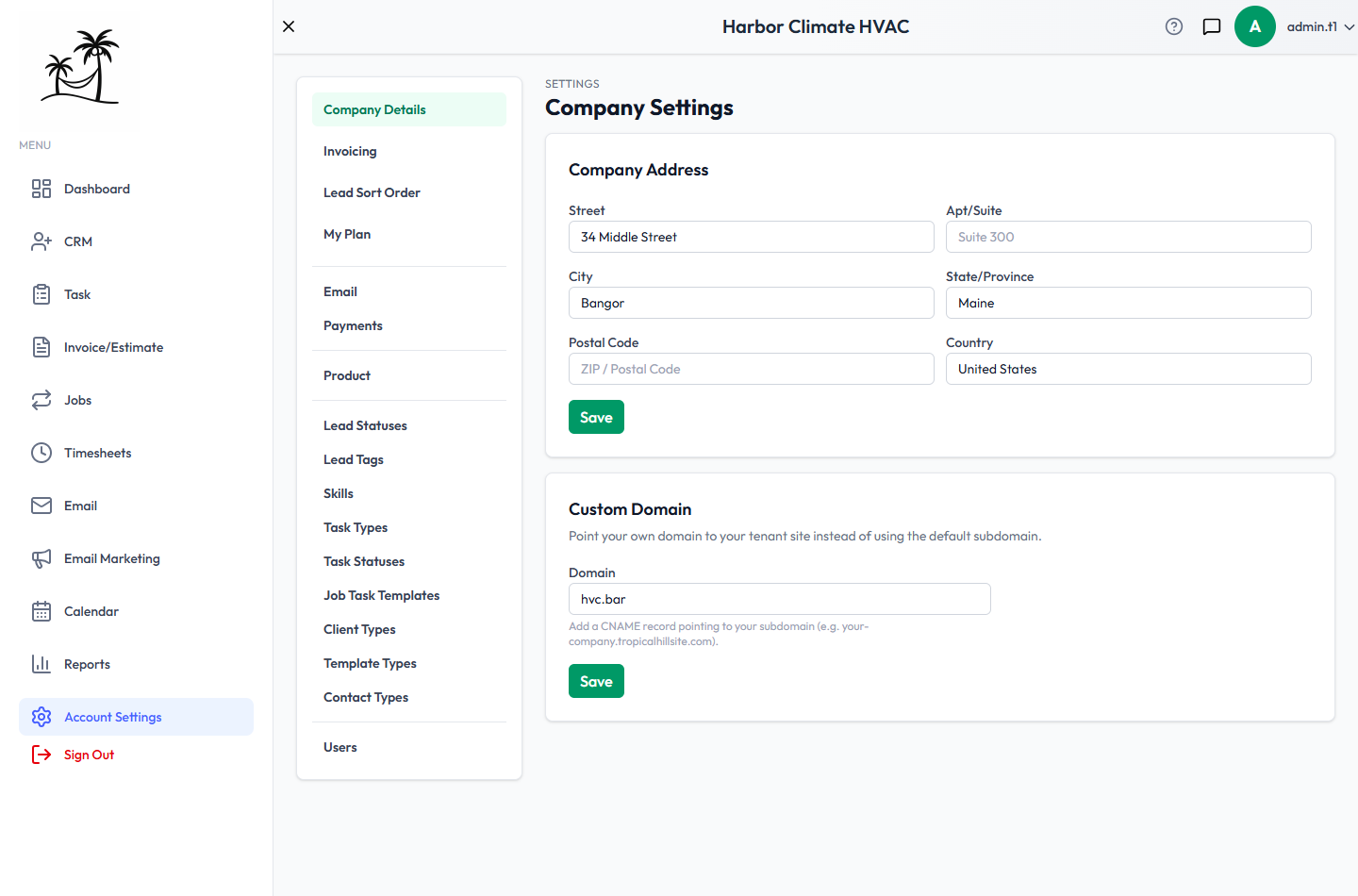
The first four items are tabs on this page. Everything below them opens its own page.
Set these up first
You can start using Tropical Hill right away, but these five are worth doing before you add real work.
- Company Details — your business address. It appears on what customers see, and it's the starting point for route planning on the Jobs map, so it's worth getting right early. Set a Custom Domain here too if you have one.
- Invoicing — your Company Logo, Default Tax Rate, and the default payment terms and notes that pre-fill on new documents. All easy to forget until your first invoice is half-built. See Company Profile & Branding.
- Product — the services and items you sell, with prices. Estimates, invoices and job line items all pull from this list, so nothing can be billed until it has something in it. See Managing Services & Pricing.
- Users — your team, and who gets admin access. See Managing Users & Roles.
- Email — connect the mailbox you send from. Until you do, nothing can email a customer. See Email Setup.
Then, when you need them: Payments to take card payments on invoices, and Skills if you dispatch by certification.
Everything in Account Settings
On this page
| Item | What it's for |
|---|---|
| Company Details | Business address and custom domain. See Company Profile & Branding. |
| Invoicing | Company logo, default tax rate, and the payment terms and notes that pre-fill on new estimates and invoices. |
| Lead Sort Order | The order the Leads grid falls into when you haven't sorted it yourself, built from your statuses and tags. |
| My Plan | Your billing status, the Stripe billing portal, and switching plans. |
Connections
| Item | What it's for |
|---|---|
| The mailboxes you send and receive from — primary, marketing and shared. See Email Setup. | |
| Payments | Connect Stripe so customers can pay an invoice online by card. See Accepting Online Payments. |
What you sell
| Item | What it's for |
|---|---|
| Product | Your price list of services and items, including packages, and the skills each service needs. See Managing Services & Pricing. |
The lists you choose from
Each of these fills a dropdown elsewhere in the app. All but Skills and Job Task Templates come with sensible defaults, so you can rename and extend rather than start from nothing.
| Item | Fills | Starts with |
|---|---|---|
| Lead Statuses | The stages on the Leads Board | Defaults you can rename |
| Lead Tags | The hot-to-cold grade on a lead | An A–F scale |
| Skills | Technician matching on Dispatch | Empty — add your own |
| Task Types | The kind of a task, and the Task Board columns | Defaults |
| Task Statuses | Where a task stands | Open, In Progress, Done |
| Job Task Templates | Ready-made checklists for Multi-Task Jobs | Empty — add your own |
| Client Types | Categories for clients, such as Residential | Defaults |
| Template Types | Categories for email templates | Newsletter, Promotional, Transactional, Announcement |
| Contact Types | A person's role on a lead or client | Defaults |
Your team
| Item | What it's for |
|---|---|
| Users | Add teammates, set admin access, attach skills, deactivate someone who leaves. See Managing Users & Roles. |
On a website-only plan
The list shows only Company Details and My Plan. The rest comes with the plans that include the CRM — upgrade under My Plan.
Tips
- Rename the default statuses and types to match the words your team already uses, rather than adding new ones alongside them. Every list is easier to shorten than to untangle later.
- You can't delete a list entry that records are still using. Deactivate it instead: it disappears from the dropdowns and existing records keep it.
- Come back to My Plan before you hire — seat limits are a one-click upgrade, and finding out at "Add User" is a bad moment.